Choose a guide#
Start from the broker cards displayed in Broker settings in your account. A broker appearing on a marketing page is not proof that live execution is available in your environment.
At the time of this review, Live orders are placed through Alice Blue and Fyers. Dhan and Upstox can be connected, but Live order placement through them is not yet supported.
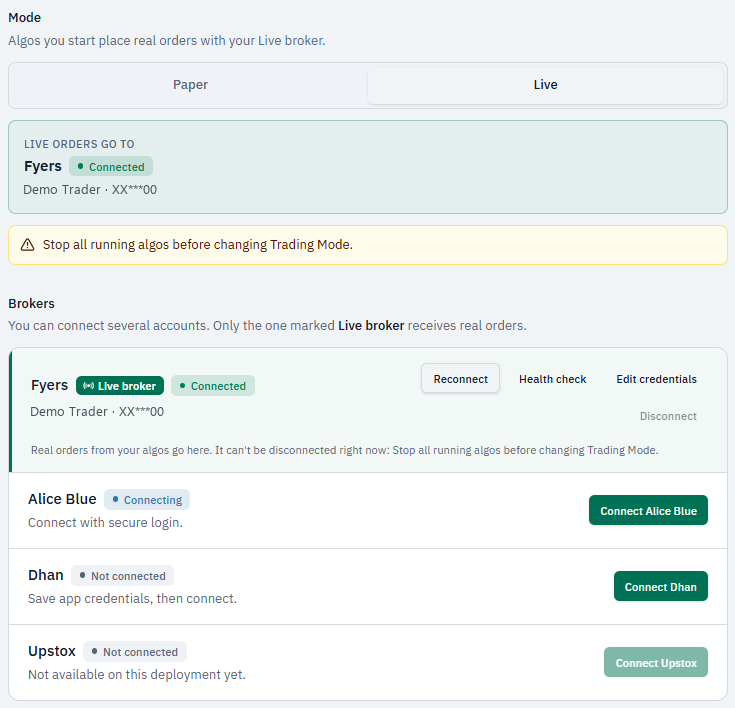
Connection states#
| State | Meaning for you |
|---|---|
| Connecting | An authorization process is underway |
| Connected | An authenticated connection is recorded |
| Session expired | Re-authentication is required; use Reconnect |
| Needs attention | The connection is degraded; inspect the message or run Health check |
| Error | The last connection attempt failed; read the message and connect again |
| Not connected | No connected session exists for that broker |
A health check can help diagnose identity or account access. It does not place a test order or certify that a specific strategy can execute.
Select a live broker#
After connecting, review the Live broker selection in Broker settings. Confirm the account identity before selecting Live execution for a strategy.
Different brokers can have different credentials, permissions, instruments, and account prerequisites. Do not copy one broker's setup into another broker's card.
Before a live session#
Confirm the mode, selected account, supported contract, and any setup requirement displayed in the app. Inspect unresolved orders or exposure from previous sessions before starting another one.
For an introduction without real order submission, follow your first paper session.